
Video from Santa: Their Name on His Nice List
Video from Santa that shows your child their letter arrived: their name on it, in his Nice List, on their present. In your browser, no app, no photo of them.
Christmas Eve is the night it matters: make it now and it is ready long before bedtime.
Video from Santa
The clip comes with crackling fire, sleigh bells and a "ho ho ho". Santa does not read the name out loud: it is written in the scene.
Your clip in a few minutes · No editing app needed · Failed runs refunded automatically
Video from Santa examples to make theirs
Real AI Santa video examples creators posted, each one ready to reuse: pick it in the generator above, type your child's name and wish, and the video from Santa is about them.
The Nice List by the fire
What is a video from Santa here?
A video from Santa on this page is 12 vertical seconds at the North Pole written around one child: Santa holds up a letter with their name on it, writes them into his Nice List, or ties their name to the present they asked for. You type their first name and their wish, nothing else. It is the most personal video from Santa you can make in minutes, because the scene itself carries their name.
Each clip below was posted by a creator on Instagram as their own AI Santa video: Santa holding up a child's drawing at a candle-lit desk, Santa painting a toy train at his bench, Santa's sleigh waving over a Christmas market. Pick the one your child would believe, type their name and wish, and that scene is remade around them.
Creative engine
What one video is
Seedance 2 Mini builds the scene from the words you typed. Whichever Santa scene you pick costs one clip, and a run that fails is refunded to your balance automatically.
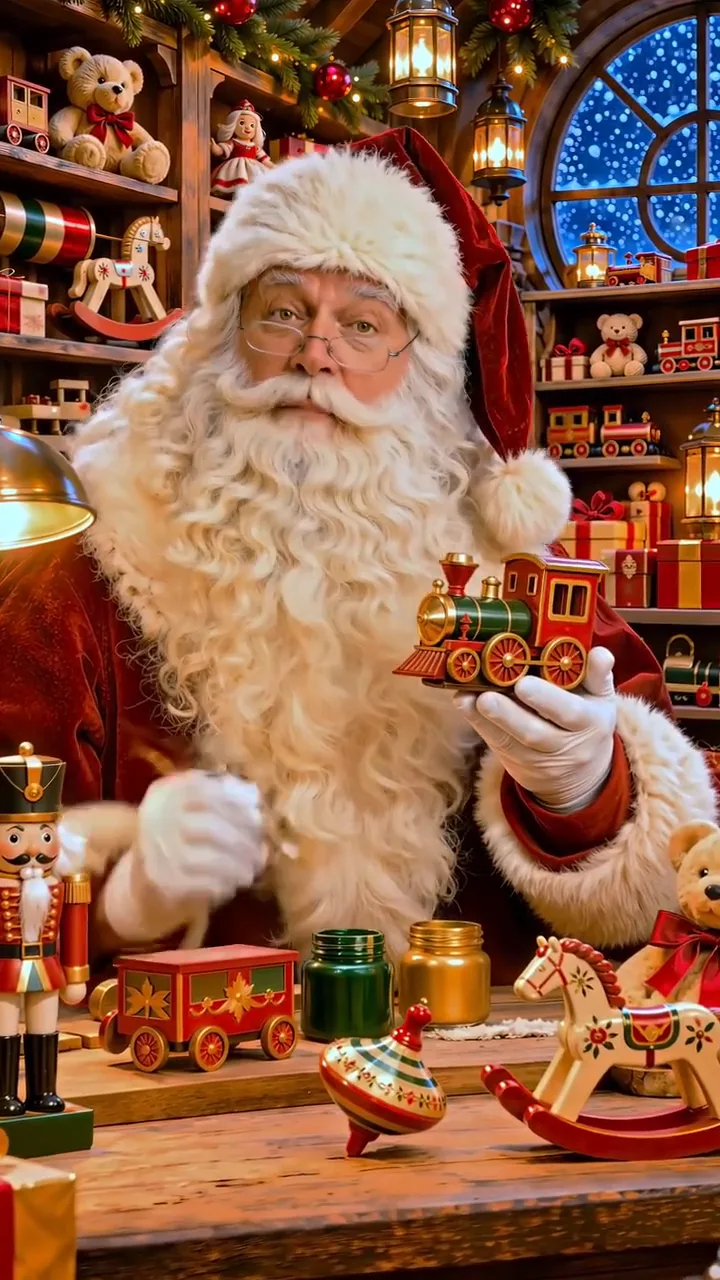
Santa at his bench
He looks up from the toy he is finishing, the workshop shelves full behind him.
The letter, held up to the camera
Santa turns the drawing round so your child sees it is theirs.
How to make a personalized video from Santa
Four steps, a few minutes, and nothing your child can catch you doing: no app to install, no camera, no costume, no photo of them.
Type their first name
The name you would write on the envelope to Santa. That spelling is the one in the scene, so check it.
Add what they asked Santa for
One present from the letter: a red bike, a puppy, a dinosaur that roars. Santa paints it, wraps it or finds it in the letter.
Pick the Santa scene
The letter at his desk, the Nice List by the fire, the workshop table, the sleigh over the city.
Play it for them
Download the video from Santa as an MP4 with no watermark. Play it on your phone at breakfast, cast it to the TV, or send it to the grandparents first.
A video from Santa for every stage of believing
The same twelve seconds land differently at three and at eight. Pick the scene for where your child is this Christmas.
The first Christmas they understand
Two or three years old, and Santa is suddenly a real person who lives somewhere. A video from Santa where he holds up a letter with their name on it is the moment that makes him real, and they will ask to watch it again before bed.
The one who mailed a letter
They wrote it, you posted it, and now they keep asking whether it arrived. Show them the letter dropping into Santa's workshop and Santa reading it. That is the best answer to "did he get it?" you will ever give.
The seven-year-old with questions
Friends at school are saying things. A personalized Santa video where their name is already written in the Nice List, in a book they have never seen, buys you another Christmas of believing.
The grown-up who never got the magic
Your partner, your big sister, the friend whose Santa was cancelled early. Type their name and a joke wish, and pick Santa diving through a ring of fire onto a reindeer. The funny AI Santa video works on adults too, and when it is your sister's birthday rather than Christmas, the happy birthday sister video puts her in the scene herself.
Video from Santa FAQ
What parents ask before they make one.
No. Santa does not read the name out loud; the name is written into the scene instead: on the letter he holds up, in his Nice List, on the gift tag. What you hear is the fire, sleigh bells and a warm "ho ho ho". A name in Santa's own handwriting is something a child can point at and keep pointing at.
No, and you can't: this page does not take children's photos. You type a first name and one wish, and Santa is the only person on screen. Nothing that shows what your child looks like ever leaves your phone.
That is what the name is for. One dad on r/SideProject said his two-and-a-half-year-old was "thoroughly convinced" by a picture of Santa on their own roof; a letter with their own name on it in Santa's hands does the same job. Play it like it just arrived, not like something you made.
Yes, by showing it. Type the present into the second box and Santa paints it at his bench, wraps it at the workshop table or finds it drawn in their letter. A dad on r/daddit did the same thing with Santa voice messages about his little one's Pokémon wish; here the wish is on screen.
Twelve seconds, vertical. Long enough for the letter, the name and the wink, short enough that a small child watches all of it. A dad building his own Santa tool on r/SideProject said the long, pre-recorded Santa videos lose kids who are used to short clips.
No. The video from Santa you download is an MP4 with no watermark, so nothing in the corner gives the game away. On r/SideProject a parent who paid for an AI Santa video elsewhere still got one with a watermark and said so.
Usually within a few minutes, while you stay on the page. In the same r/SideProject thread a parent waited three hours for a Santa video from another site. Make the video from Santa the evening before and it is there long before breakfast.
No, it is a clip, not a live call: Santa does not answer back. What you get is a video from Santa you play whenever you like, as many times as they ask, with their name already in it.
Yes. Type their name and a wish that only they would get, a new knee, a quiet house, a pizza oven, and pick Santa's stunt run or the sleigh. Adults are the easiest audience for a funny personalized Santa video.
Watching the examples on this page costs nothing; making one is a one-time payment with no subscription: your first video is $4.99, then $9.99 a video, or $19.99 for three and $29.99 for five, so siblings each get their own. A failed run is refunded to your balance, and the MP4 carries no watermark.
AI birthday video generator pricing — pay per clip, once
Buy the one clip you came for, or a few for every birthday coming up. Paid once, nothing to cancel, unused clips wait on your balance.
- 1 birthday clip, 12s at 720p
- Any scene: champagne, star sign, crown cake, a toast
- No subscription
- 5 birthday clips, 12s at 720p
- Any scene, any birthday person
- No subscription, clips never expire
- 3 birthday clips, 12s at 720p
- Any scene, any birthday person
- No subscription, clips never expire
Pay safely and securely with

Payments are processed over an encrypted checkout by our payment provider. Your card details are never stored by AI Birthday Video Generator.
Make the video from Santa they will ask to watch again
Their first name, the present they asked for, and Santa holding it all up to the camera before bedtime tonight. A run that fails is refunded to your balance. There is no better way to show them Santa got the letter.